Editorial disclosure: This page is written by the LeMingle team. Competitor facts are sourced from official pages and dated; recommendations reflect product positioning, not invented test data.

Who this guide is for
- People searching for an Immersive Translate alternative or a language-learning complement
- Users processing large volumes of foreign webpages, PDFs, ebooks, or video
- Learners who understand through translation but do not accumulate natural phrasing
- Anyone trying to separate information-access tools from language-learning tools
Method and conflict-of-interest disclosure
This comparison is written by the LeMingle team. Immersive Translate descriptions come from its official documentation, usage pages, and Chrome Web Store listing as checked September 27, 2026. LeMingle claims are limited to current verifiable capabilities. We do not repeat unverified efficiency percentages or treat installation volume as learning evidence.
The products are not exact category matches. Immersive Translate is primarily a broad information-access and bilingual translation tool. LeMingle is an expression-discovery and memory tool for language learners. The useful comparison is therefore whether your current barrier is access to information or access to natural language use.
Capability map
| Job | Immersive Translate | LeMingle |
|---|---|---|
| Webpages | Identifies main content and provides bilingual / paragraph translation | Keeps original text and identifies idioms, collocations, vocabulary, and other expressions |
| PDFs / ebooks | Official documentation supports document formats and bilingual export | Not a current core capability |
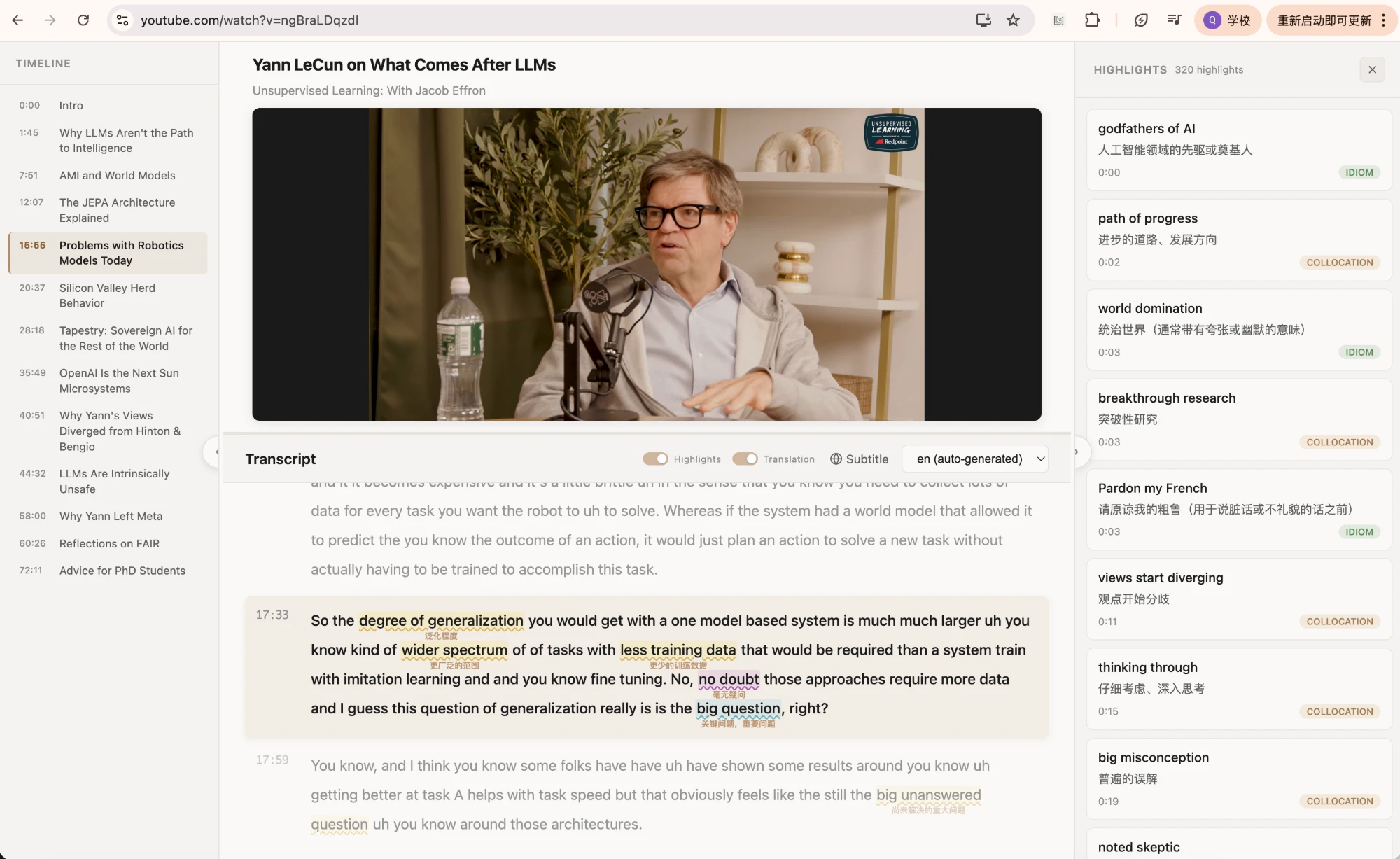
| Video captions | Officially supports YouTube bilingual captions and subtitle-file translation | YouTube Reader aligns overlay captions, transcript, and expression list |
| Translation scope | Paragraph, full page, hover, input box, and other broad contexts | Selective contextual explanation rather than full replacement |
| Learning emphasis | Reduce the comprehension barrier | Notice source-language chunks, tone, and conditions of use |
| Saving and recurrence | Not the central story in official documentation | Saving, cloud sync, and later re-highlighting |
| Best material | Unfamiliar, large-volume, access-driven content | Mostly comprehensible content worth mining for language |
Immersive Translate is strongest at information access
Its documentation emphasizes bilingual webpage reading, hover translation, input-box translation, PDFs and ebooks, and video subtitle translation. For anyone crossing a language barrier to obtain information, that breadth removes copy-paste and tool switching.
Typical jobs include scanning unfamiliar reporting, processing a long PDF, browsing foreign social media, or adding bilingual captions to a video. Learning how the source phrased every idea can reasonably remain secondary to completing the information task.
LeMingle is strongest at making the original noticeable again
When full translation is visible, attention naturally shifts to the easier line. Information is gained, but the English choices may pass unnoticed. LeMingle keeps the original dominant, makes a small number of high-value expressions salient, and explains them in the current context.
For example, That argument doesn’t hold water can be translated as “that argument is not convincing.” The message is clear, but a learner still needs to see hold water as a unit, understand that it tests reliability, and notice its negative evaluation. A later encounter in reporting, a forum, or a video adds typical subjects and grammar.
Why “understood” and “learned” are different outcomes
Information access is complete when you can recover the author’s point and act. Learning also requires attention to source form, conditions of use, and later recognition or production without assistance. Both matter, but they require different cognitive actions.
Translation lowers comprehension cost but does not guarantee processing of the original. Selective highlighting increases salience but does not guarantee memory. Retrieval, later encounters, and use remain necessary. No tool completes mastery merely by displaying an answer.
| Stage | Question | Useful support |
|---|---|---|
| Information access | What does this say? | Full-page or paragraph translation |
| Expression noticing | How does the original say it? | Idiom, collocation, and context highlighting |
| Form knowledge | What are the boundary, tone, and limits? | Original sentence, explanation, multiple examples |
| Memory retrieval | Can I recognize it without the answer? | Spaced recall and later encounters |
| Active use | Can I produce it naturally elsewhere? | Personal examples and real output |
Choose by material and goal
For long, unfamiliar, time-sensitive content, prioritize comprehension coverage. For familiar, mostly comprehensible content where the goal is better English, keep the source visible and use selective attention. Do not assign yourself one permanent category; the same person should switch across tasks.
| Scenario | Prioritize |
|---|---|
| Long PDF, ebook, or unfamiliar domain | Immersive Translate |
| Full bilingual webpage reading | Immersive Translate |
| Familiar English industry article | LeMingle |
| Idioms, collocations, and tone in YouTube | LeMingle Reader |
| Need comprehension and language learning | Translate first, then remove broad translation and study selectively |
A combined workflow: separate the stages
Time separation is the key. If first-language translation and multiple phrase popups compete on screen, the interface manages your attention instead of the content. Finish understanding first; then learn how the original says it.
- Complete the information passUse bilingual translation on unfamiliar material to build a map of claims, structure, and terminology.
- Restore the originalRemove full-page coverage and return only to the most relevant paragraphs or video segment.
- Select two to five expressionsKeep chunks that change meaning, matter personally, or are likely to recur.
- Retrieve on later encountersWhen a saved phrase reappears, recall before reopening help.
Privacy and sensitive content belong in the decision
Before sending company email, contracts, unpublished research, or personal data through any translation or AI-assisted tool, review current privacy terms, data flows, and organizational policy. Feature fit does not authorize every content type.
This comparison is not a security review. Store permissions, server-side processing, and privacy policies can change; consult current official materials.
Bottom line
Choose Immersive Translate for large, unfamiliar, multi-format content where fast and accurate understanding is the priority. Choose LeMingle when most content is already comprehensible and you want to discover natural phrasing and preserve it through later encounters.
They do not need to replace each other. For many users, the sensible sequence is exactly this: translate when necessary, return to the original after understanding, and learn only a few high-value expressions.
Frequently asked questions
Can LeMingle replace Immersive Translate for full-page translation?
That is not the current goal. Immersive Translate officially spans webpages, PDFs, ebooks, and video translation. LeMingle focuses on keeping the original visible, selectively explaining expressions, and supporting later encounters.
Should language learners avoid full-page translation?
No. Unfamiliar, urgent, or high-stakes content should be understood accurately. Complete the information task, then remove broad translation and return to a small amount of original text for language learning.
Will the two extensions conflict if enabled together?
Overlays can compete or overload attention. A more stable workflow switches by stage: translate first, then remove broad coverage and use selective expression learning.
Sources and verification
- Immersive Translate — Official introductionOfficial scope and feature documentation checked September 27, 2026.
- Immersive Translate — Usage documentationOfficial instructions for webpages, YouTube, subtitle files, and documents.
- Immersive Translate — Chrome Web StoreOfficial listing; permissions and capabilities should be checked against the live version.
- LeMingle YouTube ReaderLeMingle’s current public expression-learning workflow.