Immersive language-learning browser extension · Multilingual

Understand real-world expressions—
and remember them

On YouTube and the web, LeMingle spots expressions where you know every word but still miss the meaning. See what they mean in context, then get reminded when they appear again.

◎ Meaning in context
+ Save as you learn
↻ Reappearance reminders

Free to start · 30-second setup · Chrome / Edge

youtube.com/watch · LeMingle Reader
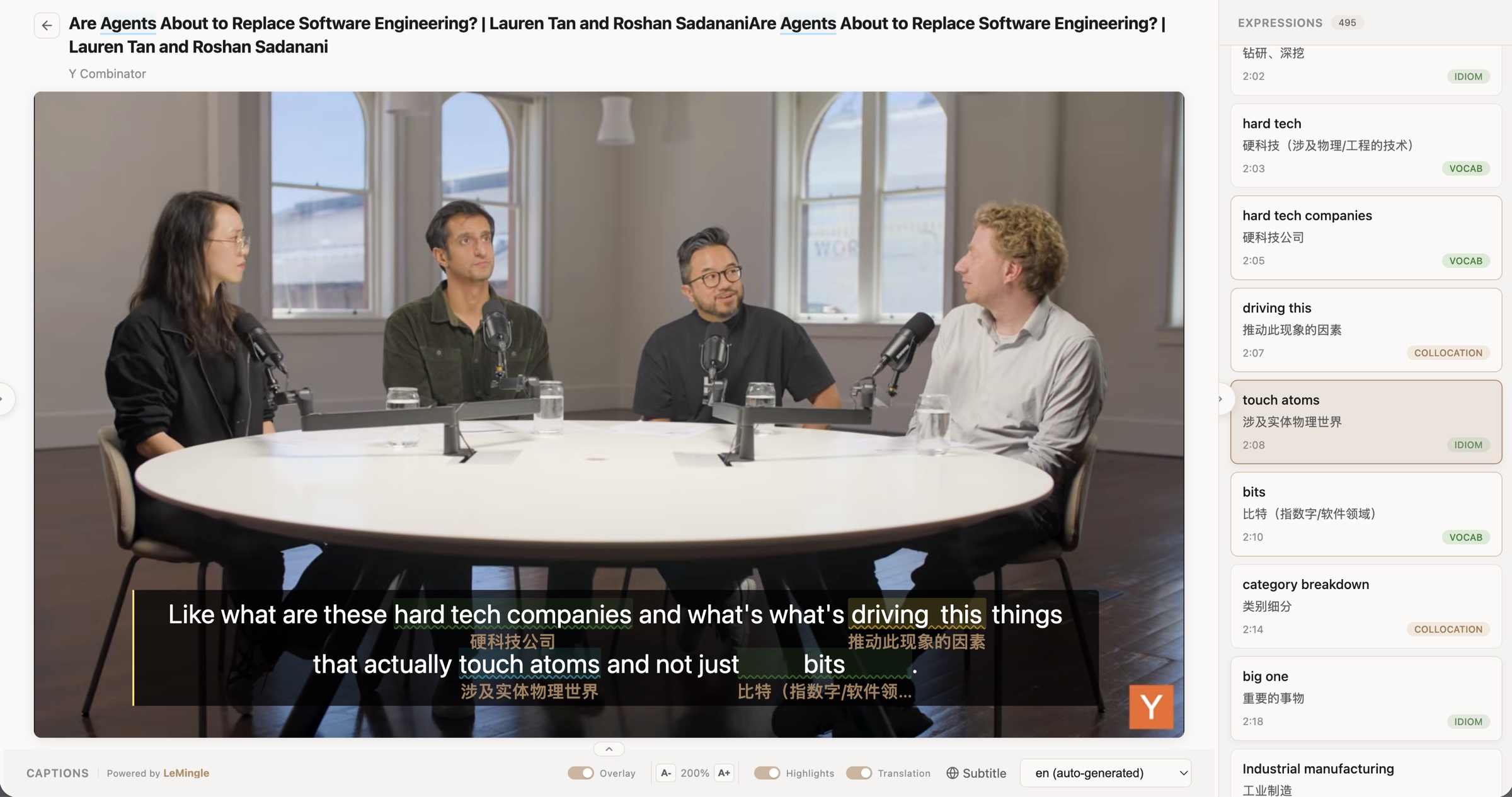
LeMingle YouTube Reader:视频字幕、逐句 Captions 与 Expressions 边栏同步联动
01 双行悬浮字幕 02 Captions 同步跟随 03 Expressions 自动定位

LEARNING PATHS

Start with what you already watch and read

Learn English with YouTubeA complete workflow for captions, authentic expressions, and shadowing →Learn English while browsingTurn industry articles, email, and papers into language input →

TWO WAYS TO LEARN

Learn inside the content you already consume

No new study routine. Video and web reading share the same flow: discover, understand, save, and meet expressions again.

▶

YouTube Reader: learn while you watch

A compact two-line overlay keeps the video visible while Captions and Expressions follow playback, turning interviews, podcasts, and vlogs into learnable material.

Captions, context, pronunciation, and saving stay in one view
⌁

Web highlights: build language while you read

Turn on AI highlights for an article, email, or paper. LeMingle uses the surrounding context to surface useful collocations, idioms, and vocabulary.

Learn expressions tied to your actual work and interests
↻

Across content: turn encounters into memory

Saved expressions are highlighted when they appear again in another page or video, giving you a fresh context instead of a disconnected flashcard.

Every natural re-encounter deepens your understanding

FROM SEEING TO USING

From not getting it, to understanding it, to remembering it.

With authentic expressions, you may know every word and still miss the meaning. LeMingle explains what they mean in context, then highlights them again when you meet them later.

01 Discover

Find expressions that make no sense literally

LeMingle looks beyond unfamiliar words to spot collocations, idioms, and everyday native phrasing—the expressions whose words you may know but whose meaning you can still miss.

AI 精选 “be the culprit” Spot non-literal language
02 Understand and save

Make the meaning clear in its real context

Hover to see what it actually means in this sentence, what kind of expression it is, and how it sounds. Once it clicks, save it in one step.

语境释义 悬停理解 From confusion to clarity
03 Meet it again

Meet it again, remember it naturally

When a saved expression appears in another page or video, LeMingle highlights it again. Every new context moves it from something you recognize toward something you can use.

已收藏 “be the culprit” Repeated in real context

CLEAR BY DESIGN

Only what the feature needs is sent

When you enable or trigger AI highlighting, LeMingle sends the text segments needed for analysis together with the page or video title, URL, domain, and learning preferences. We also record essential product-usage events to improve the service, but we do not sell your data or use it for advertising.

Ready to level up?

Pick the plan that fits your learning goals

View pricing plans

Frequently Asked Questions

Six things worth knowing before you start

🆚 How is LeMingle different from a dictionary extension?

A dictionary waits for you to look something up. Once you enable AI highlighting, LeMingle uses context to surface useful collocations, idioms, and vocabulary—and marks saved expressions when you meet them again.

📊 Who is LeMingle for?

It is best for intermediate-to-advanced learners who can already follow foreign-language content but want to sound more natural—especially people who watch YouTube, read papers, handle international email, or follow industry content.

🌐 Which browsers are supported?

LeMingle currently supports Chromium browsers including Chrome, Edge, Brave, Arc, and Opera. Install it from the Chrome Web Store or Microsoft Edge Add-ons. Safari and Firefox are not supported yet.

💰 Is LeMingle free?

LeMingle offers Free and Pro plans. See the pricing page for the current quota and included features.

🔒 What data is sent for AI highlighting?

When you enable or trigger AI highlighting, LeMingle sends the text segments needed for analysis together with the page or video title, URL, domain, and learning preferences. We also record essential product-usage events. We do not sell this data or use it for advertising. See the Privacy Policy.

What happens after I save an expression?

The expression stays in your collection. When it appears again on a later page or video, LeMingle re-highlights it so you can recognize it in a new context.

Still have questions?

Contact us

Ready to make daily reading more valuable?

Your next video or article can become language-learning material

Install extension for free
✅ 100% free to start ⚡ 30-sec setup 🔒 Privacy-first