Editorial disclosure: This page is written by the LeMingle team. Competitor facts are sourced from official pages and dated; recommendations reflect product positioning, not invented test data.

Who this guide is for
- People looking for a Language Reactor alternative or complementary tool
- YouTube or Netflix learners unsure whether captions or phrase-level meaning is the real bottleneck
- Intermediate learners who follow content but want more natural language
- Buyers who want a task-based decision rather than a feature-count ranking
Method and conflict-of-interest disclosure
This comparison is written by the LeMingle team and should not be treated as neutral editorial coverage. Language Reactor facts come from its official Chrome Web Store listing as visible on September 27, 2026. LeMingle claims are limited to capabilities verifiable in the current site and extension code. User counts and ratings are not treated as evidence of learning effectiveness.
We also avoid unverifiable “used for 30 days” labels. The comparison covers official claims, visible workflows, and the interaction required by different goals. Platform support, pricing, and features can change; check official pages before deciding.
Capability map
The table describes where each ability sits in the workflow rather than turning every row into a winner.
| Job | Language Reactor | LeMingle |
|---|---|---|
| Learn with Netflix | Explicit official support; bilingual subtitles are central | Not a primary current product claim |
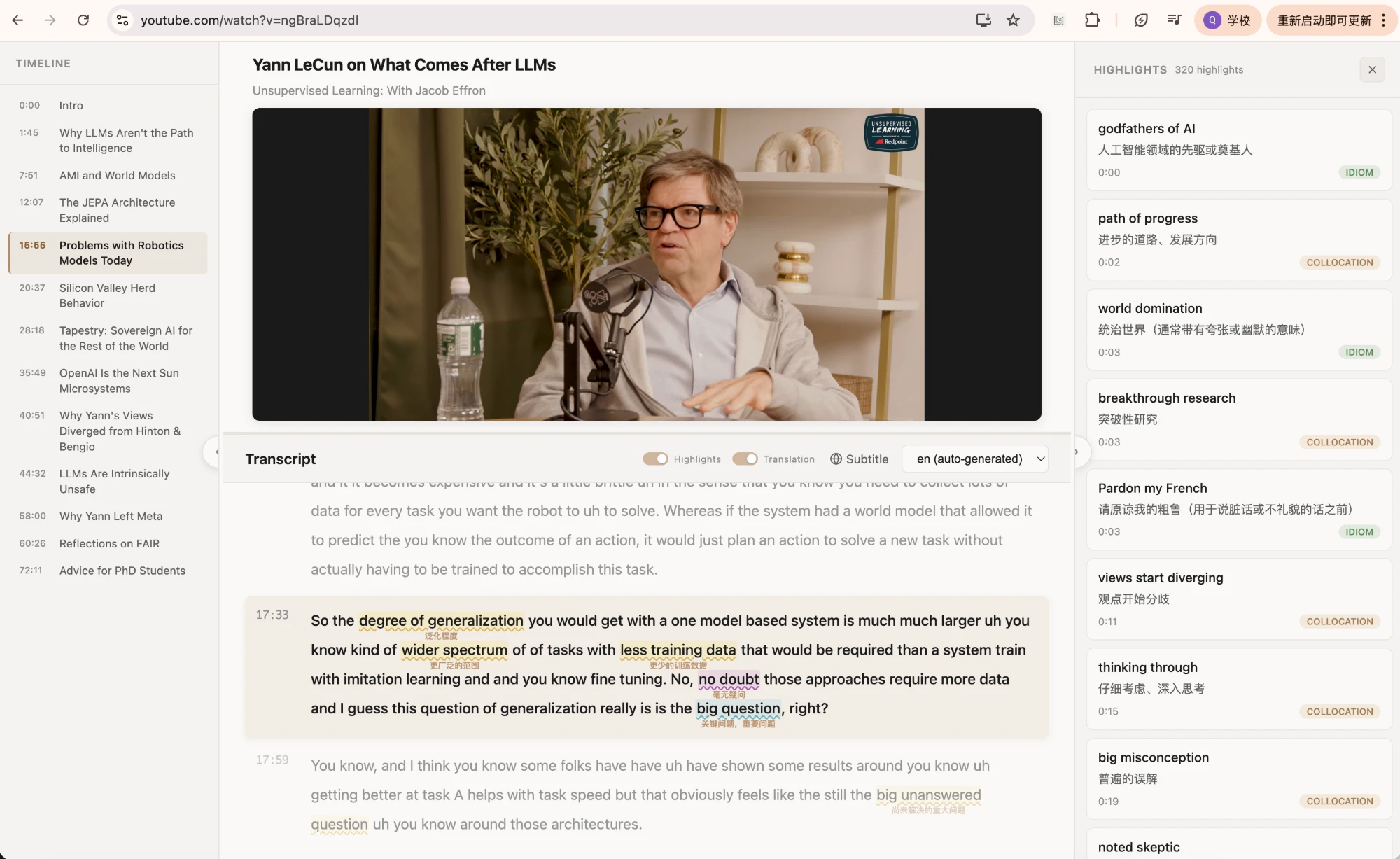
| Learn with YouTube | Dual subtitles, popup dictionary, playback controls | Reader, synchronized captions, expression highlights, list, translation control |
| Word lookup | Popup dictionary is a core capability | Contextual meaning and pronunciation, but not word-only |
| Idiom / collocation discovery | Not the primary distinction in the store description | Category-based identification in the original line |
| Later encounters | Cross-web re-highlighting is not a central official claim | Saved expressions re-highlight in later content |
| Web text | Official listing mentions text import, translation, and TTS | Works on the page currently being browsed |
| Learning control | Explicit video-control toolkit | Caption, expression, and shadowing-focused Reader workflow |
Where Language Reactor is the more direct fit
Its official listing describes dual-language subtitles, a popup dictionary, and precise playback controls on Netflix, with YouTube support and text import. That is a coherent main workflow for learners who need to pause line by line, look up words quickly, and preserve comprehension with bilingual text.
It is especially relevant when the main problems are sound-to-text alignment, pace control, or Netflix as the primary content source. Subtitle and playback layers are then the central learning infrastructure.
Where LeMingle is the more direct fit
LeMingle targets a different breakdown: the captions and words are visible, yet phrases such as read the room, walk something back, or raise a red flag remain easy to miss. Reader highlights expression categories in the transcript, keeps an expression list synchronized, and supports the same expression-learning model on webpages.
Later re-highlighting extends capture beyond one video. You may save walk it back in an interview and meet it days later in reporting or a forum. The second context adds object choice, tone, and grammar. That cross-content recurrence is part of LeMingle’s core product story.
Choose by bottleneck, not brand
A2–B1 learners often need stronger caption and dictionary scaffolding to keep content comprehensible. B1–C1 learners increasingly encounter familiar words arranged in unfamiliar pragmatic patterns. These are not rigid levels; one person can need translation for a contract and expression work for a familiar interview.
A practical rule: if most pauses mean “I do not know this word,” improve subtitle and lookup support. If they mean “I know the words but do not understand what this line is doing,” improve phrase discovery and context.
| Primary friction | Prioritize | Likely fit |
|---|---|---|
| Cannot hear; needs bilingual alignment | Caption and playback control | Language Reactor |
| Netflix is the main source | In-platform subtitle workflow | Language Reactor |
| Captions are clear; idioms and tone are not | Expression categories and contextual meaning | LeMingle |
| Wants webpage and video saves to connect | Cross-content re-highlighting | LeMingle |
| Both problems recur | Use each at its strongest stage | Complementary use is reasonable |
How the tools can complement each other
If Netflix is central, Language Reactor can manage captions, dictionary, and playback while LeMingle handles expression discovery on YouTube and the web. The condition is interface discipline: two competing subtitle overlays and popup systems can consume more attention than they save.
You can also switch by difficulty. Use bilingual support for an unfamiliar topic; on familiar material, remove the first-language line and shift to expression and shadowing work. The tool should recede behind the task.
- Name the current jobInformation access, speech segmentation, or authentic-expression learning?
- Keep one primary interfaceAvoid simultaneous overlays and competing popups.
- Separate capture from reviewSave a few items now; retrieve through later contexts or active output.
Bottom line
Choose Language Reactor for a Netflix / YouTube-centered subtitle toolbox where bilingual lines, dictionary lookup, and playback controls are the main value. Choose LeMingle when you already consume English and the remaining bottleneck is idiom, collocation, pragmatic meaning, and memory across content.
The best product is not the one with the longest feature list. It is the one that removes the friction causing your actual pauses.
Frequently asked questions
Is LeMingle a direct replacement for Language Reactor?
Not one-for-one. Language Reactor officially centers Netflix and YouTube subtitles, dictionary lookup, and playback. LeMingle centers expression discovery, contextual meaning, and later encounters across webpages and YouTube.
Can I use both extensions?
Yes, by task or platform. Avoid running overlapping subtitle and popup layers at the same time; choose one primary interface for the current friction.
Which is better for intermediate learners?
It depends on the breakdown. If bilingual captions are necessary to follow content, prioritize subtitle controls. If the gist is clear but idioms and tone remain opaque, prioritize expression discovery.
Sources and verification
- Language Reactor — Chrome Web StoreOfficial listing; feature descriptions checked September 27, 2026.
- LeMingle YouTube ReaderLeMingle’s current public Reader workflow and interface.