Editorial disclosure: This page is written by the LeMingle team. Competitor facts are sourced from official pages and dated; recommendations reflect product positioning, not invented test data.
Who this guide is for
- People searching for a Trancy alternative or comparing browser-based language tools
- Learners who need integrated subtitles, full translation, and grammar support
- Users who find broad learning suites busy and want selective phrase learning
- B1–C1 learners who mainly consume English webpages and YouTube
Method and disclosure
This page is written by the LeMingle team. Trancy details come from its official website, manual, and Chrome Web Store listing as checked September 27, 2026. LeMingle claims are limited to capabilities verifiable in the current site and code. We do not repeat unverified learning-effect claims from competitor marketing or treat feature count as learning effectiveness.
This is not one universal ranking. Breadth can reduce tool switching while increasing interface and decision complexity. Focus can reduce cognitive load while leaving some jobs to other tools. The key question is how much you want one product to do in a single session.
Feature and workflow map
Trancy lists many capabilities. This table includes the ones most relevant to a real choice and supported by official pages.
| Job | Trancy | LeMingle |
|---|---|---|
| Video platforms | Officially lists YouTube, Netflix, TED, course platforms, and more | Current core video product is YouTube Reader |
| Captions | Bilingual captions, reading mode, sentence segmentation, practice | Synchronized overlay, transcript, translation and highlight controls |
| Web translation | Word, sentence, and full-page immersive translation | Does not center full-page translation; keeps original text for expression discovery |
| Grammar help | Officially offers AI grammar / syntax analysis | Full grammar analysis is not the current core |
| Expression discovery | Officially highlights lookup, grammar, and unknown words | Extracts categories including idioms, collocations, and vocabulary |
| Saving and learning | Word and sentence saving, decks, and practice | Saving, pronunciation, cloud sync, and later re-highlighting |
| Interface direction | Many tools and modes | Fewer modes centered on current content and expressions |
Trancy’s advantage comes from breadth
Its official site brings together bilingual video subtitles, subtitle reading, AI lookup, grammar analysis, sentence segmentation, listening and speaking practice, selection translation, immersive page translation, and learning decks. For users who want to move between understanding, analysis, and practice without assembling multiple products, integration is a benefit.
It also fits learners whose material varies widely across streaming, course platforms, webpages, and documents. Check current plan limits, platform compatibility, and language support on official pages because these can change.
LeMingle’s advantage comes from selectivity
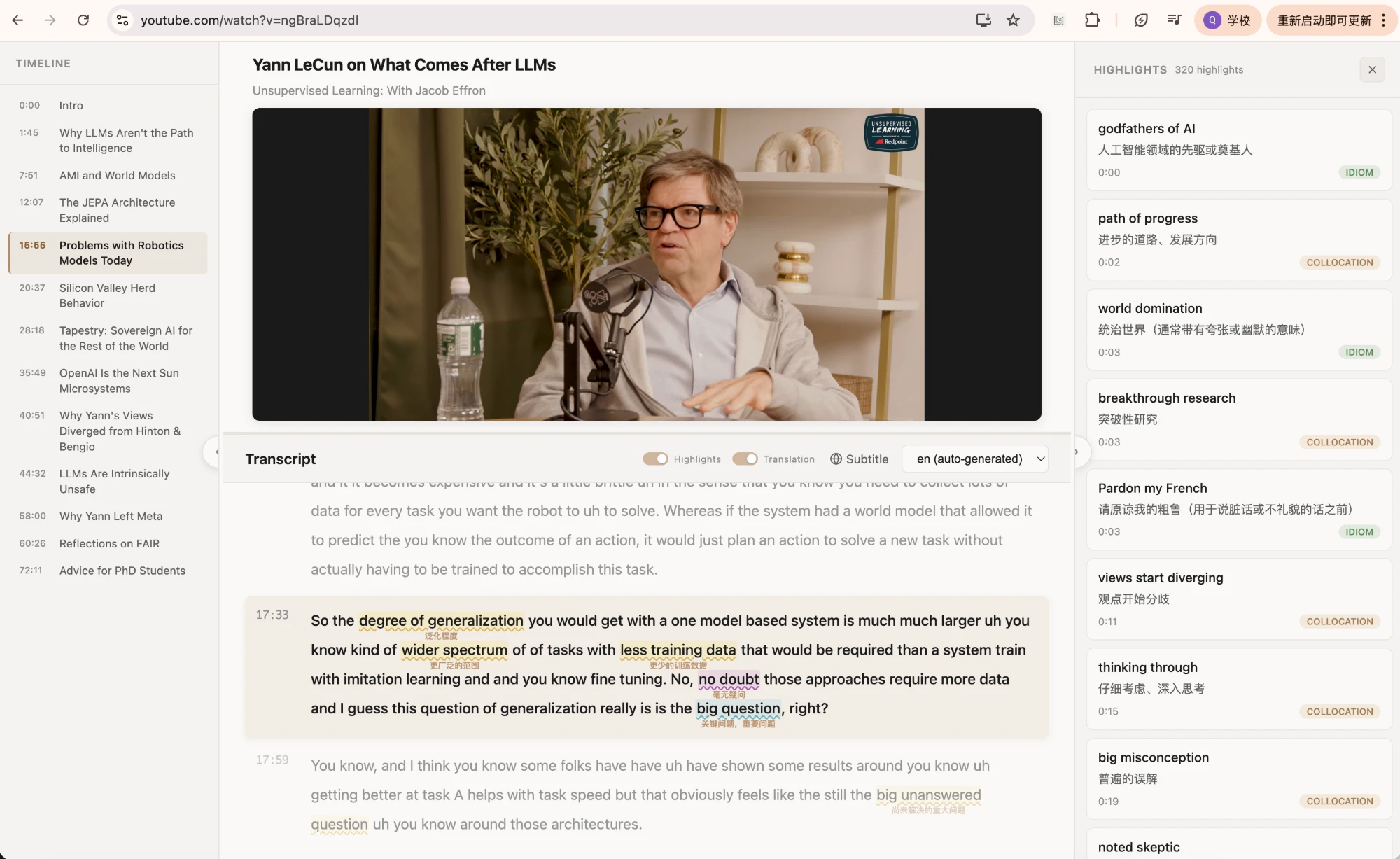
LeMingle does not try to translate every page or place every grammar tool in one session. It first identifies multiword expressions worth noticing and highlights categories in the original sentence. Hover cards provide contextual meaning, pronunciation, and saving; Reader keeps captions, transcript, and expression list aligned with playback.
This narrower scope suits learners who already understand most content but feel that translation supplies the message without explaining the natural phrasing. Saved expressions can then reappear in later pages or videos, extending learning beyond the first lookup.
More features do not always mean a better session
Breadth creates choices: captions, full translation, grammar, practice, lookup, and AI assistance. Experienced users may build a powerful workflow; new users may spend attention configuring it. A focused product reduces choice but needs help elsewhere for PDFs, Netflix, or systematic grammar analysis.
A good constraint is one primary job per session. If the content is unfamiliar, use translation and subtitles. If the goal is natural expression, turn off broad assistance and keep the original visible. Existing features do not need to be active.
| What matters most | Stronger fit |
|---|---|
| One account across platforms and study modes | Trancy |
| Full-page translation and grammar analysis | Trancy |
| Preserve original text and surface only a few expressions | LeMingle |
| Saved expressions reappear across webpages and YouTube | LeMingle |
| Broad support sometimes, focus most of the time | Use by session rather than declaring one permanent winner |
Three typical users
- Learner still dependent on bilingual translationProtect comprehensible input first. Trancy’s broader subtitle, translation, and analysis stack is likely the closer match.
- English-content professionalIf articles and videos are mostly understandable but professional collocations and tone remain the gap, LeMingle maps more closely.
- Learner who likes a complete study systemIf you enjoy configuring modes and keeping practice centralized, start with Trancy. If you value a quieter interface and passive re-encounter, test LeMingle.
A minimal combined workflow
For unfamiliar material, use Trancy’s bilingual captions or full translation to establish understanding. Then remove broad translation and use LeMingle on the original to choose a small number of expressions. This separates information access from learning how ideas are phrased.
Avoid running two highlight, translation, and popup systems on the same page at once. Overlapping interactions add accidental triggers and make source quality harder to judge.
Bottom line
Choose Trancy when the main need is an integrated suite spanning bilingual subtitles, web translation, grammar analysis, and practice. Choose LeMingle when you already consume English and need less interface, more selective expression discovery, and cross-content recurrence after saving.
If uncertain, test both on the same five-minute clip. Which controls do you actually use—translation and grammar, or contextual phrase meaning and saving? Behavior is a better fit signal than a feature checklist.
Frequently asked questions
Both products highlight language. Is the purpose the same?
Not exactly. Trancy officially combines unknown-word highlighting with translation, grammar, and learning decks. LeMingle centers category-based expression discovery and re-highlighting saved expressions in later content.
Which one should I choose for full-page translation?
Trancy officially provides immersive full-page translation. LeMingle does not make full-page translation its central job; it preserves the original and explains selected expressions.
Can I keep both extensions installed?
Yes, but use one primary overlay per page. A sensible split is information access first and selective expression learning second.
Sources and verification
- Trancy official websiteOfficial feature pages checked September 27, 2026.
- Trancy — Chrome Web StoreOfficial store listing for current feature and platform descriptions.
- LeMingle YouTube ReaderLeMingle’s current public Reader workflow.