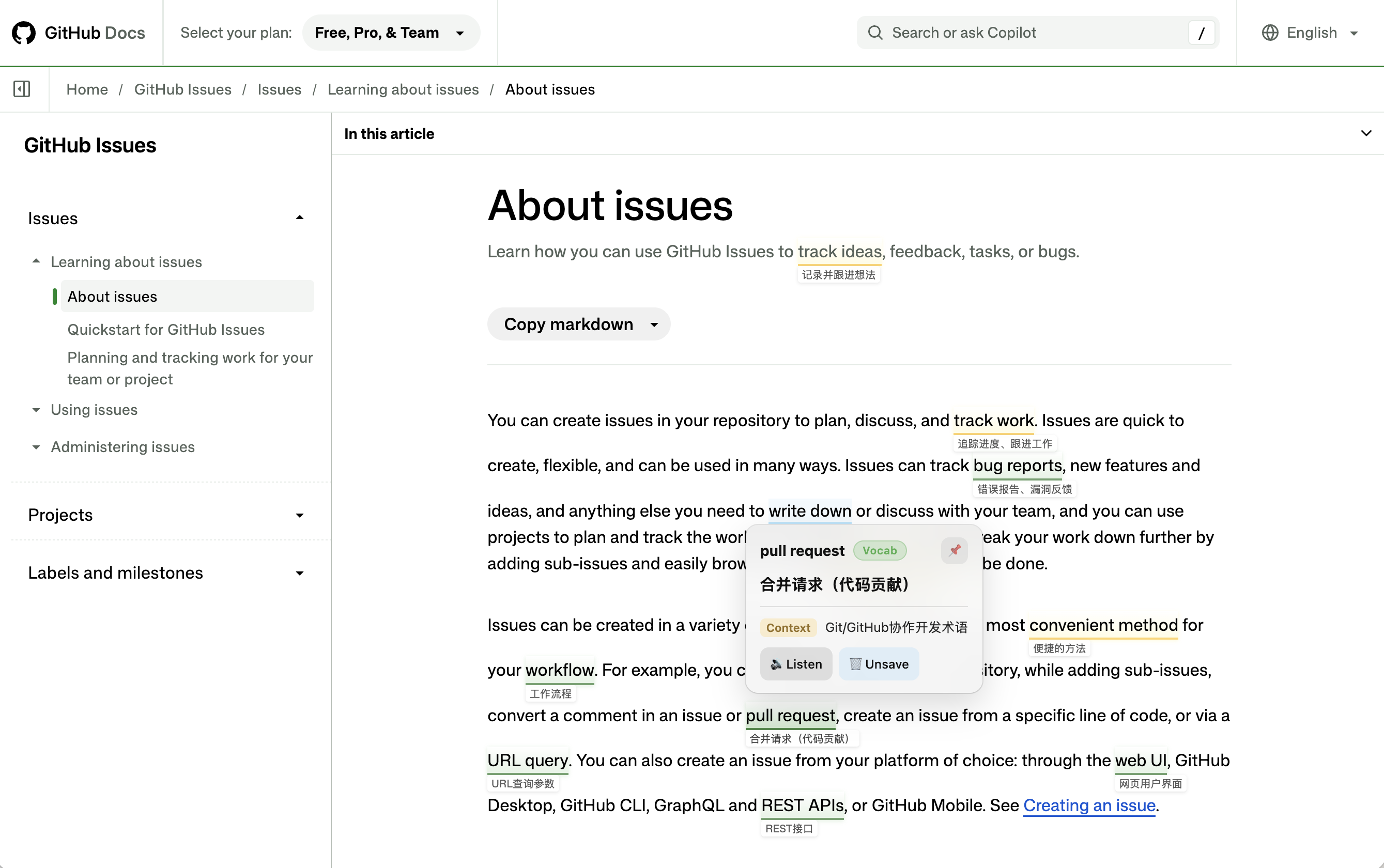
Who this guide is for
- Upper-year undergraduates and postgraduate students who read papers, course materials and specialist talks, and want language for seminars and research meetings.
- Professionals who read English documentation, industry reports or interviews and want more precise language for meetings and discussions.
- Learners with some English already who would rather build on their existing reading and viewing habits than schedule another course.
English learning extensions: which fits what you need?
You may already have a translation extension. It helps you understand a passage, but after you finish the article or interview, the phrases you could have used in your next conversation often slip away. For learners with an existing foundation, that is a useful problem to address.
If you want to learn from professional content and keep the English you could use later, start with LeMingle. It fits language learning into reading and watching you already do. The other tools have different strengths; this table helps you see where each fits.
| Extension | When it fits your needs | Relevant features |
|---|---|---|
| LeMingleOur first choice | Understand professional content and collect expressions for future conversations | Expression highlights, field preferences, contextual definitions, saved-expression reminders, flashcards and YouTube Reader |
| Immersive Translate | Read whole pages, long documents or PDFs in two languages | Web, PDF and subtitle translation, with context-aware translation and terminology features |
| Language Reactor | Work closely with original-language YouTube or Netflix video | Dual subtitles, a pop-up dictionary and detailed playback controls; text import and read-aloud are also listed |
| Trancy | Combine subtitle learning, sentence analysis and web reading | Bilingual subtitles, grammar analysis, web translation and sentence saving; AITalk is a separate conversation offering |
| Relingo | Build vocabulary through everyday browsing at a chosen difficulty | Difficulty-based highlights, saved-word reminders, flashcards and YouTube subtitles |
| Migaku | Make cards from original content and review on desktop and mobile | Contextual AI explanations, cards with source sentences and audio, spaced repetition and a mobile app |
Familiar word, unfamiliar meaning: notice what you might miss
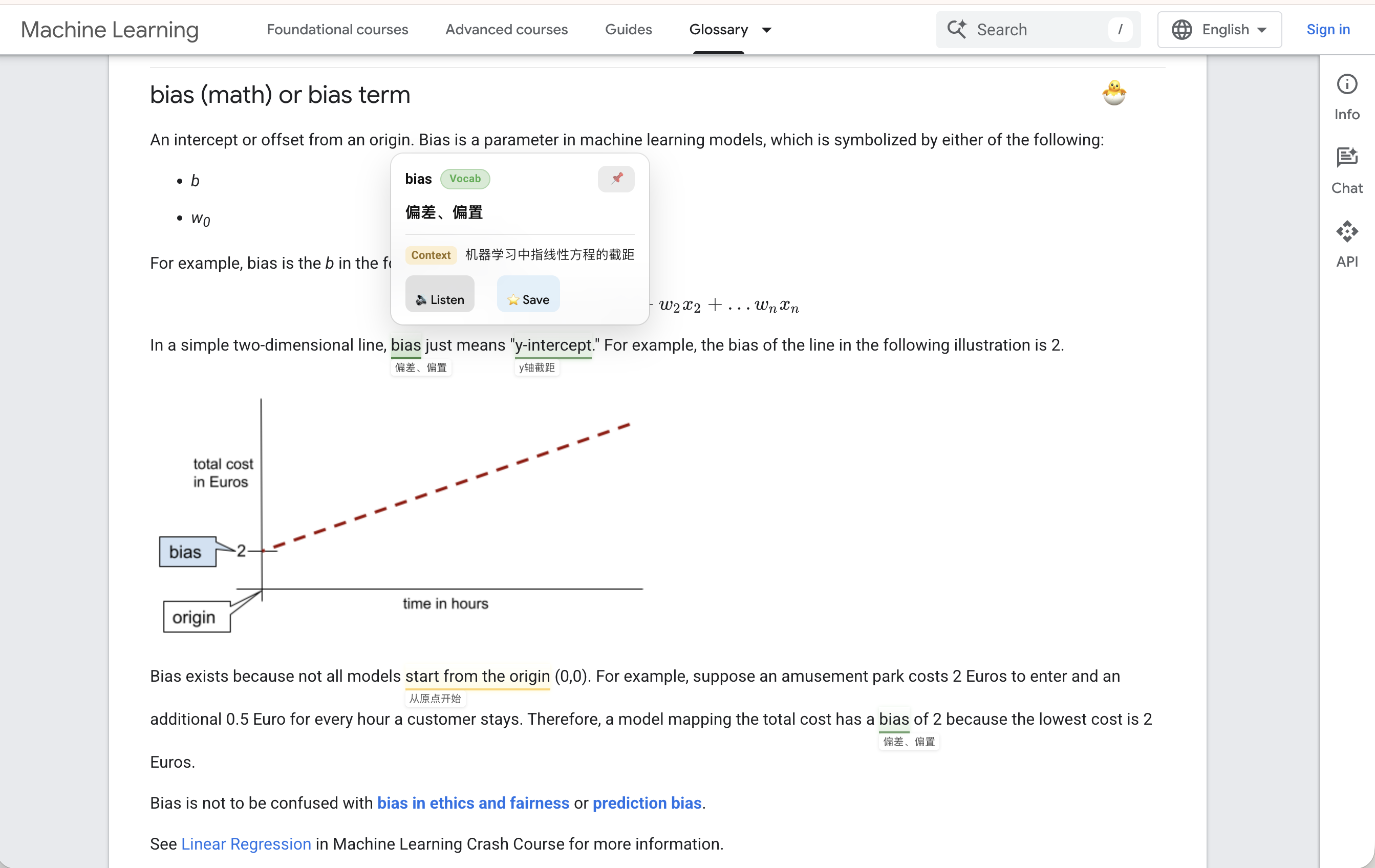
The easiest words to overlook are often the ones you think you know. In a machine-learning paper, bias need not mean prejudice. In semiconductor manufacturing, yield has a more specific meaning than simply producing something. Familiar spelling can hide an unfamiliar concept.
An unknown word makes you stop. A familiar one can pass unnoticed. LeMingle identifies vocabulary, collocations and idioms worth looking at, then offers definitions in context. You have another chance to notice a useful expression without having to decide, sentence by sentence, what deserves a lookup.
If you have a particular discipline in mind, set a professional field preference. Current options include general, law, finance, medicine and a custom field. For software development or semiconductor manufacturing, enter a custom field in settings to bring the focus closer to the material you read.
A field preference guides expression identification; it cannot promise to catch every term or explain everything correctly. Check the original definition when the meaning affects research, business or technical decisions. For learning, its benefit is a timely prompt to investigate.
| Word | An easy assumption | What to check in context |
|---|---|---|
| bias | It always means prejudice | In a model-parameter context it can refer to a bias term. Google’s glossary distinguishes this from other uses. |
| yield | It just means output or giving way | In semiconductor production it relates to the proportion of acceptable results; see Samsung’s explanation. |
| resolve | It means completed successfully | A resolved Promise is not simply the same as a fulfilled one; see MDN. |
Understanding a technical passage means knowing what a word means here
Looking up bias is only the beginning. Does this passage concern a model parameter, sampling or fairness? You need the surrounding sentences to identify the intended meaning. LeMingle’s contextual definitions let you check near the original wording, then continue reading.
Treat combinations such as underlying issue, temporary workaround and be exposed to as units too. Memorizing issue alone may not help you explain the problem beneath a surface symptom. Dropping temporary from a workaround can also change what your update implies.
Small words carry important limits in academic and professional writing. In the example below, may and under these conditions tell you how far the claim goes. After checking the highlighted expression, look again at its subject, negatives and conditions so your retelling stays accurate.
You understand it, but cannot say it: save language for your next discussion
You read the material before a research meeting, yet when it is your turn you fall back on “There is a problem.” You know what you mean, but the more precise wording will not come. What you need may be a useful phrase, rather than a harder word.
LeMingle’s saved expressions and flashcards help you keep these combinations. Check a meaning as you read, save what matters, and receive a highlight when it appears again in supported web content. When you want to practise deliberately, use flashcards, pronunciation and the original material you saved it from.
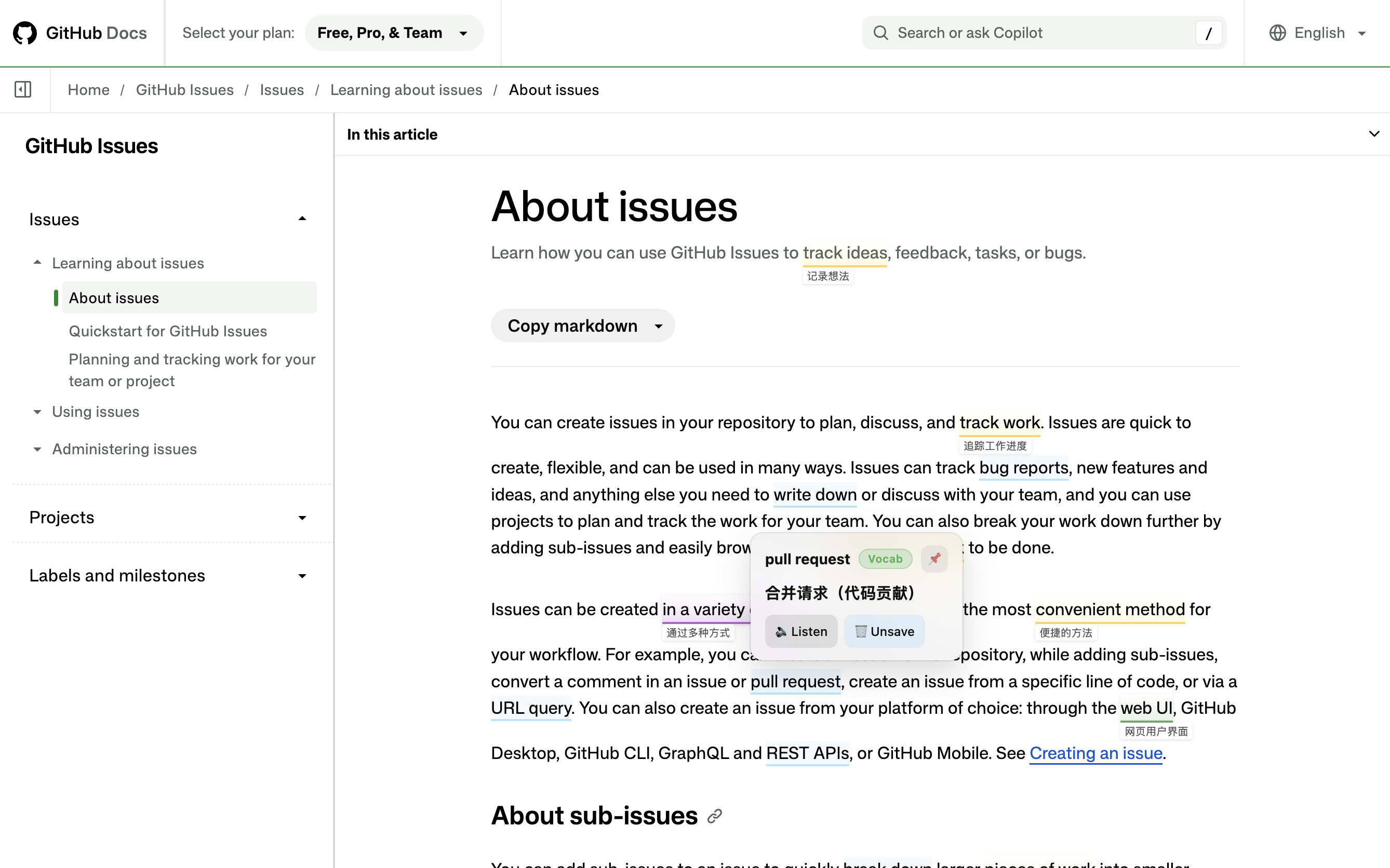
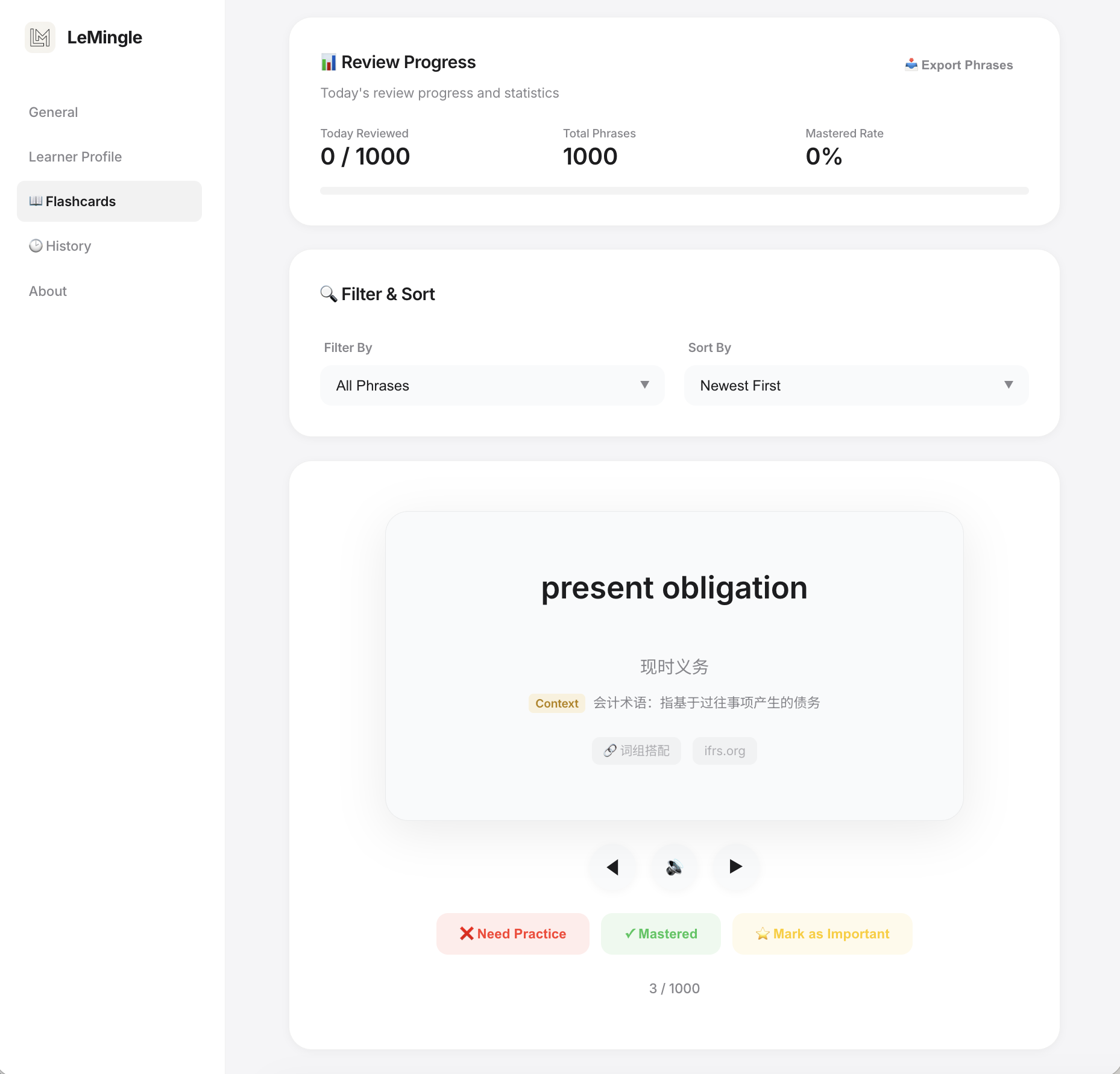
For an update meaning “we can deal with it for now, but the cause is still there,” temporary workaround and underlying issue give you more precision than problem alone. Understand the source sentence first, then adapt the wording to a real situation in your project.
Saving and seeing a phrase again prepare material for speaking. You still need to retrieve it yourself. Choose one expression you are likely to use soon, close the source and explain your situation in a couple of sentences. That is an easier starting point than collecting endlessly.
- Keep a combination you will need soonSave temporary workaround, rather than only the dictionary meaning of workaround.
- Retell it using your own situationReplace the project details while preserving the original limits and tone.
- Recall it before your next discussionReview the card, listen, then speak without looking. Ask a teacher or colleague for feedback when useful.
Papers, documentation and reports: where LeMingle fits your reading
LeMingle is particularly useful when you already understand a subject and read about it in English. You know the model, business or process; you want to connect English wording with that knowledge and find suitable language when discussing it.
That is why we recommend it to upper-year students, postgraduates and professionals. Your reading is already related to the conversations ahead. A few expressions that matter to you can be more immediately useful than another collection of general study material.
Consider the following reading situations. Whether you study or work in Japan, Korea, Hong Kong, Taiwan or elsewhere, the deciding factor is the kind of material you need to understand and discuss.
| What you read | Where understanding or speaking gets difficult | What to focus on with LeMingle |
|---|---|---|
| Research papers and lectures | You know terms but miss qualifications, or translate sentence by sentence in a seminar | Check terms and combinations in context, then practise a retelling that preserves the qualifications |
| Technical docs and developer talks | Familiar words such as issue and resolve change meaning; project updates lack precision | Set a relevant field and distinguish a fix, a release and a status you have actually verified |
| Finance, accounting and industry reports | You recognize exposure or provision but are unsure about the object or scope | Check definitions beside the passage; consult the standard or notes for important accounting meanings |
| Semiconductor and engineering material | Short words such as yield, die and node invite an everyday reading | Read them with the manufacturing stage and measurement scope, then explain your own situation |
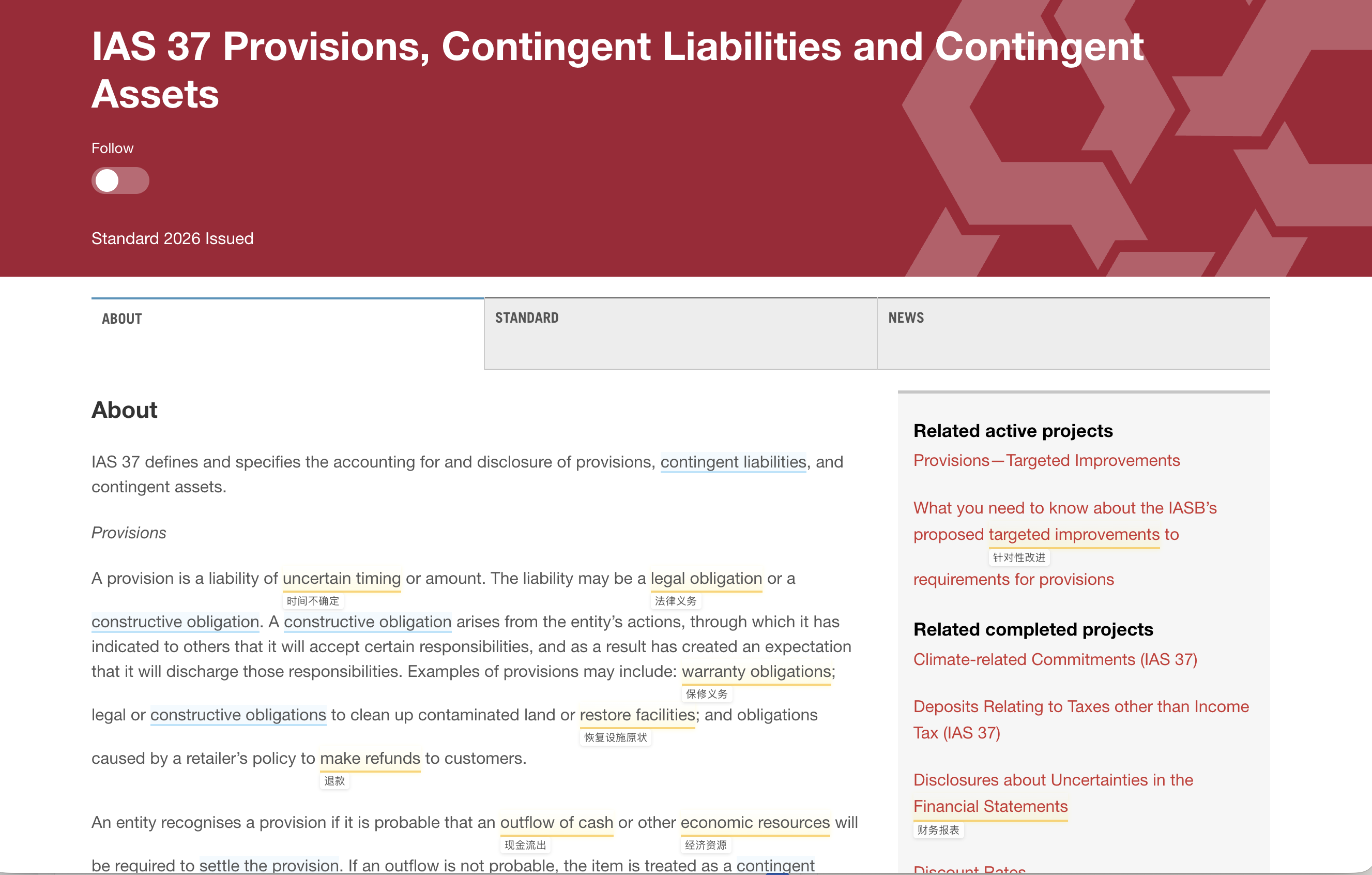
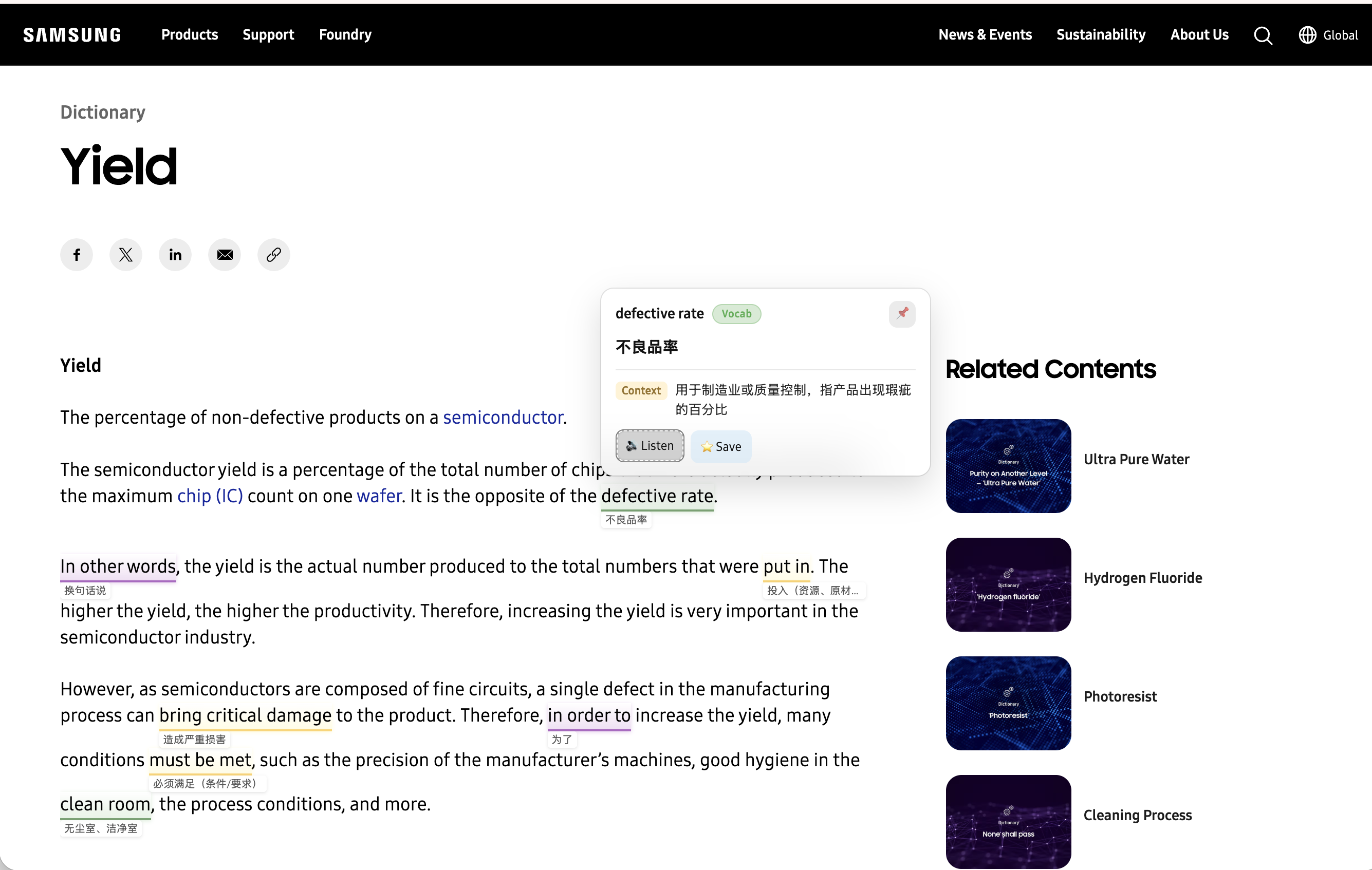
LeMingle connects web reading and video with your expression collection
Every article need not become a full English lesson. LeMingle highlights expressions in web text; YouTube Reader brings captions, definitions and the expression list into one place for interviews and lectures. Stay with the content, then look more closely when you need to.
Reader follows playback with synchronized captions and expressions. Two-line overlay caption pages, definition toggles and font controls let you choose how much help stays on screen. You can also return to expression records organized by video before a discussion or presentation.
On ordinary web pages, the optional Reveal mode lets the highlight background and definition appear gently while the original text stays in place. Check an expression near its source without replacing your entire page with a translation.
You also control what stays in your collection. Remove something you already know and the current device remembers that choice so it is not automatically saved again. You can still save it manually later. The aim is a collection relevant to you.
- While reading: notice relevant expressions and check meanings or pronunciation when needed.
- While watching: match an expression to the passage you are hearing and revisit the sentence.
- When it appears again: connect a saved expression with its new context.
- Before speaking: review the source or flashcard and practise using a phrase that fits your situation.
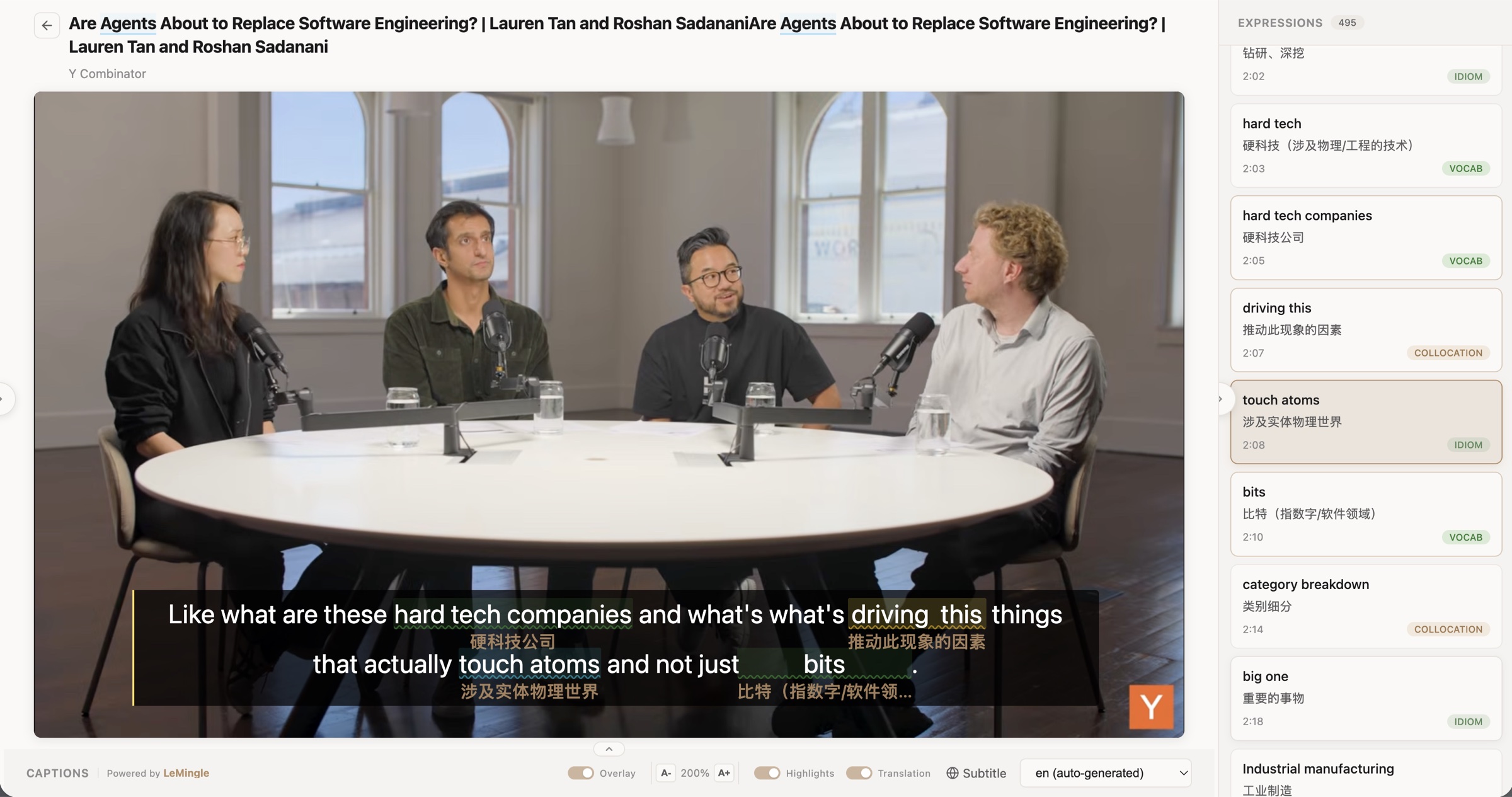
Why we recommend LeMingle first for this kind of learner
For reading professional content while building language you can later use, LeMingle is our first choice. Expression discovery, contextual meaning, saved-expression reminders and active review sit close to the content you already use. You can begin before deciding on a full card-making or study routine.
If another extension already serves you well, keep the part that works. Here is what each alternative emphasizes and when LeMingle adds something relevant to your needs.
| What matters to you | How LeMingle fits | What another tool emphasizes |
|---|---|---|
| Keep useful language while reading the original | Discover expressions, understand them and save them for later encounters | Immersive Translate focuses on bilingual understanding across web pages, PDFs and other formats, with context and terminology features |
| Review language from both articles and videos | Web highlights and YouTube Reader provide expression-learning entry points for both habits | Language Reactor offers YouTube/Netflix dual subtitles, a dictionary and detailed playback control |
| Begin with what is in front of you | Notice, understand and save a phrase, then return to it later | Trancy combines subtitles, grammar analysis and web translation, with AITalk for conversation |
| Go beyond unfamiliar vocabulary | Field preferences and expression types draw attention to specialist meanings and combinations | Relingo emphasizes difficulty-based vocabulary growth, alongside saved-word reminders, flashcards and subtitles |
| Start collecting before planning a card routine | Begin with the page or video you already need, then use reminders and existing flashcards | Migaku connects content-based card creation with spaced repetition and mobile review |
Start with a page you already need to read today
Open a relevant English article in desktop Chrome or Edge and choose your definition language. If your reading has a clear professional focus, set that field too. You do not need to organize a complete word list or find a new course first.
Read a short passage. When a useful expression appears, check its meaning, listen to it and decide whether you want to use it later. Keep what matters; familiar language does not need saving just to make your collection bigger.
Then use one expression to explain your own situation. Understanding a specialist sentence and giving a short explanation to a classmate or colleague is a concrete place to begin. You can build from that.
- Choose relevant materialTry a course reading, technical explanation or an interview you already intended to watch.
- Check one expression in contextReturn to the sentence and check who or what it concerns, its conditions and its tone.
- Keep a useful combinationSave it, keep reading, and return through later highlights or flashcards.
- Say it in your own contextClose the source, speak a couple of sentences and check the meaning. Get feedback if needed.
Choose LeMingle when you want your reading to feed your next conversation
If you want to understand professional English and build language for classes, research meetings or work discussions, LeMingle is the starting point we recommend. Highlights help you notice useful wording, context helps you understand it, and saved-expression reminders and flashcards give you ways to return.
Speaking still takes practice. What LeMingle provides is material connected to something you actually read or heard. Understand one expression today, then try it in a situation that matters to you.
Continue with learning collocations in context or the YouTube shadowing guide. For the video workflow and interface, see YouTube Reader.
Frequently asked questions
Who is LeMingle best for?
Upper-year students, postgraduates and professionals who already read English papers, documentation, industry articles or videos and want to understand the content while collecting useful language. You can start with material already part of your studies or work.
Why use it if I already know a lot of vocabulary?
A familiar word can acquire a specialist meaning, and simple words can form a phrase you do not recognize. LeMingle identifies combinations, idioms and vocabulary; field preferences help direct attention toward relevant material. Detection and explanations still need judgment.
Do I need it if I already have a translation extension?
If a translation is all you need, your existing tool may be enough. If you also want to notice useful expressions, keep them and revisit them in later reading or review, LeMingle fits that goal. Keep your existing collection; avoid letting two extensions rewrite the same area at the same time.
Relingo also brings saved words back. Why choose LeMingle?
Try LeMingle first if specialist meanings, full expressions and collocations are central to your reading. Its field preferences, expression-type highlights and web/Reader combination address that need. Relingo also offers reminders and flashcards; decide by what you want to learn and how you prefer to read.
Will LeMingle make me fluent?
It helps you notice, understand and review expressions from real content. Speaking requires retrieval, practice in a new situation and feedback. Pick a phrase from a card or source sentence and use it without looking, then check what you said.
What if mobile review, PDF translation or speech feedback is my priority?
This recommendation concerns expression learning on desktop web pages and YouTube. Consider Immersive Translate for whole-PDF translation, Migaku for mobile spaced repetition, and Trancy AITalk for conversation and speech feedback. Check each provider’s current device, language and plan details.
Sources and verification
Sources checked:2026-10-29
Written by the LeMingle editorial team. Competitor information was checked against official public sources on 29 October 2026. Recommendations reflect the needs described here, not a controlled performance ranking.
- Immersive TranslateWeb, PDF and subtitle translation; context and terminology features.
- Language Reactor — Chrome Web StoreDual subtitles, a dictionary and playback controls.
- TrancySubtitles, sentence analysis, web reading and saving.
- Trancy AITalkConversation, shadowing, custom scenarios and speech feedback.
- RelingoDifficulty-based highlights, saved-word reminders, flashcards and subtitles.
- MigakuContent-based card creation, contextual explanations and review.
- Migaku — Getting StartedExtension and mobile learning workflows and availability.
- Google — bias (math) / bias termMathematical bias terms distinguished from other senses.
- MDN — Promise.resolve()The distinction between resolved and fulfilled.
- Samsung Semiconductor — YieldYield in semiconductor manufacturing.